View the World Wide Name (WWN) of SAN storage controllers in PowerShell

World Wide Name (WWN) is a unique identifier on storage controllers that identify devices on the SAN (disk bay). This is the equivalent of MAC addresses.

1. Open a PowerShell command prompt.

2. Enter the following command:

Get-InitiatorPort

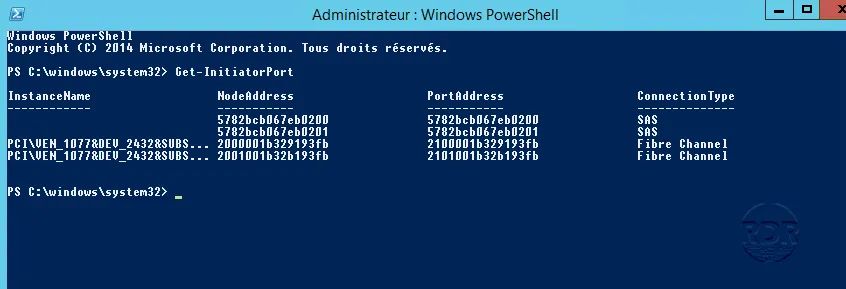
3. Here is the result of the command:
Résultat commande

On the screenshot above, we see that the server has 4 SAN, 2 SAS and 2 FC ports
Romain Drouche
System Architect | MCSE: Core Infrastructure
IT infrastructure expert with over 15 years of field experience. Currently a Systems and Networks Project Manager and Information Systems Security (ISS) expert, I use my expertise to ensure the reliability and security of technological environments.

Leave a Comment