Table of Contents
Symptom
When you try to establish an RDP connection to a server through a Remote Desktop Services (RDS) gateway, you get the following error:
Error code : 0x3000008
Your computer cannot connect to the Remote Desktop Gateway server.
Contact your network administrator for assistance.

Possible cause
This issue usually occurs when the Remote Desktop Client (mstsc) encounters an incompatibility with the transport method used by the RDS gateway.
By default, the client tries to connect via HTTP, but some network configurations or firewalls require HTTPS mode (RPC over HTTP)
Recommended solution
1. Launch the Registry Editor (regedit.exe).
2. Navigate to the next key :
HKEY_CURRENT_USER\Software\Microsoft\Terminal Server Client\RDGClientTransport3. If the RDGClientTransport value exists, change it to 1. If it does not exist, create a new REG_DWORD value named RDGClientTransport and set it to 1.
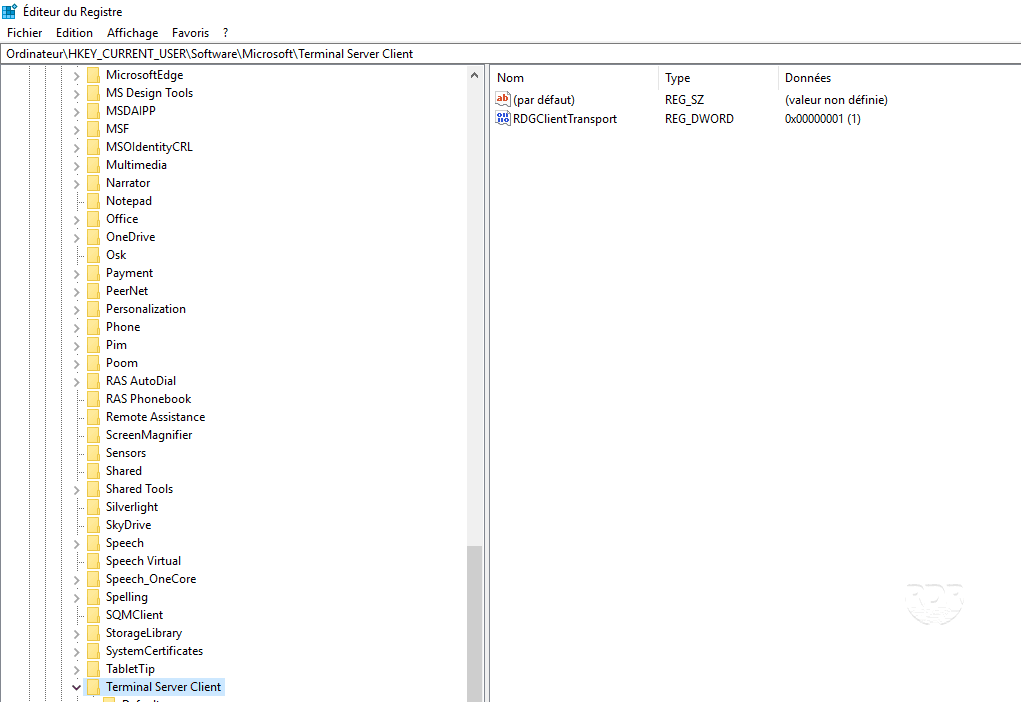
4. Then close your RDP client (if open) and restart it. The problem should be resolved.
By forcing transport over HTTPS (RPC over HTTP), the client uses a direct TLS channel that is more compatible with most modern RDS gateways.
