In this tutorial, I will explain how to clean (debloater) Windows 11 upon its deployment with MDT using a PowerShell script that we will configure as an application in MDT.
Before we begin, I encourage you to read this tutorial on configuring the PowerShell script in MDT: MDT: Run a PowerShell script as an application
At the time of writing this tutorial, it should normally be possible to perform this operation by GPO on Windows 11 25H2 which implies having the computer in a domain Active Directory and that the strategy is applied. With the PowerShell script I’m going to suggest, this cleanup operation will be performed as soon as Windows 11 with MDT is installed.
What is Debloat?
THE debloat One of Windows 11’s features is the removal of pre-installed applications and services deemed unnecessary or intrusive. Microsoft includes a lot of bloatware by default, such as Xbox, Cortana, Teams, sponsored apps, etc., which aren’t always needed, especially in a professional environment.
This approach allows:
- ofoptimize performance (fewer background processes),
- of reduce the disk space used,
- ofimprove startup time,
- of limit data collection useless,
- and to propose a more basic system clean and controlled for users.
Integrated into MDT via a PowerShell script, the debloat process is performed automatically during deploymentensuring a consistent, lightweight and secure environment from the first login.
There are several tools that allow you to clean Windows 11 of all these applications, such as:
The problem with these applications (scripts) is that they only clean up for the user who runs the script.
PowerShell debloat script for MDT
The script I am proposing here will allow the cleanup for all users of the PC because we will do the cleanup for all users and especially for future users so as not to have the installation of applications during the first opening session of domain users.
Here is the PowerShell script that you will need to integrate into MDT:
$ErrorActionPreference = "SilentlyContinue"

Write-Host ""
Write-Host "=== REMOVE PRE-INSTALLED APPLICATIONS ==="
Write-Host ""

# List of apps to delete (exact or partial)
$appsToRemove = @(
    # 3rd party
    "king.com.CandyCrushSodaSaga",
    "ShazamEntertainmentLtd.Shazam",
    "Flipboard.Flipboard",
    "9E2F88E3.Twitter",
    "ClearChannelRadioDigital.iHeartRadio",
    "D5EA27B7.Duolingo-LearnLanguagesforFree",
    "AdobeSystemsIncorporated.AdobePhotoshopExpress",
    "PandoraMediaInc.29680B314EFC2",
    "46928bounde.EclipseManager",
    "ActiproSoftwareLLC.562882FEEB491",
    "SpotifyAB.SpotifyMusic",

    #Microsoft
    "MicrosoftCorporationII.Microsoft Family",
    "Clipchamp.Clipchamp",
    "Microsoft 3D Builder",
    "Microsoft.Microsoft3DViewer",
    "Microsoft.BingWeather",
    "Microsoft.BingSports",
    "Microsoft.BingFinance",
    "Microsoft.MicrosoftOfficeHub",
    "Microsoft.BingNews",
    "Microsoft.Office.Sway",
    "Microsoft.WindowsPhone",
    "Microsoft.CommsPhone",
    "Microsoft.YourPhone",
    "Microsoft.Getstarted",
    "Microsoft.549981C3F5F10",
    "Microsoft.Messaging",
    "Microsoft.WindowsSoundRecorder",
    "Microsoft.MixedReality.Portal",
    "Microsoft.WindowsFeedbackHub",
    "Microsoft.WindowsAlarms",
    "Microsoft.WindowsMaps",
    "Microsoft.MinecraftUWP",
    "Microsoft.People",
    "Microsoft Wallet",
    "Microsoft.Print3D",
    "Microsoft.OneConnect",
    "Microsoft.Microsoft Solitaire Collection",
    "Microsoft.MicrosoftStickyNotes",
    "microsoft.windowscommunicationsapps",
    "Microsoft.SkypeApp",
    "Microsoft.GroupMe10",
    "MSTeams",
    "Microsoft.CoPilot",

    #Xbox
    "Microsoft.XboxApp",
    "Microsoft.Xbox.TCUI",
    "Microsoft.XboxGamingOverlay",
    "Microsoft.XboxGameOverlay",
    "Microsoft.XboxIdentityProvider",
    "Microsoft.XboxSpeechToTextOverlay",
    "Microsoft.GamingApp"
)

foreach ($app in $appsToRemove) {
    Write-Host "`n>>> Deleting: $app"

    #1. Current User
    Get-AppxPackage -Name "*$app*" | Remove-AppxPackage -ErrorAction SilentlyContinue

    #2. All users
    Get-AppxPackage-AllUsers | Where-Object {$_.Name -like "*$app*"} | Remove-AppxPackage -AllUsers -ErrorAction SilentlyContinue

    #3. For future users (provisioned)
    Get-AppxProvisionedPackage-Online | Where-Object {$_.DisplayName -like "*$app*"} | Remove-AppxProvisionedPackage -Online -ErrorAction SilentlyContinue
}

Write-Host ""
Write-Host "=== DELETION COMPLETE ==="


Write-host ""
Write-Host "Disable Recall"
Write-host ""
DISM /Online /Disable-Feature /FeatureName:Recall

Write-host ""
Write-Host "Edge optimization"
Write-host ""
reg add "HKLM\SOFTWARE\Policies\Microsoft\Edge" /v "EdgeEnhanceImagesEnabled" /t REG_DWORD /d 0 /f
reg add "HKLM\SOFTWARE\Policies\Microsoft\Edge" /v "PersonalizationReportingEnabled" /t REG_DWORD /d 0 /f
reg add "HKLM\SOFTWARE\Policies\Microsoft\Edge" /v "ShowRecommendationsEnabled" /t REG_DWORD /d 0 /f
reg add "HKLM\SOFTWARE\Policies\Microsoft\Edge" /v "HideFirstRunExperience" /t REG_DWORD /d 1 /f
reg add "HKLM\SOFTWARE\Policies\Microsoft\Edge" /v "UserFeedbackAllowed" /t REG_DWORD /d 0 /f
reg add "HKLM\SOFTWARE\Policies\Microsoft\Edge" /v "ConfigureDoNotTrack" /t REG_DWORD /d 1 /f
reg add "HKLM\SOFTWARE\Policies\Microsoft\Edge" /v "AlternateErrorPagesEnabled" /t REG_DWORD /d 0 /f
reg add "HKLM\SOFTWARE\Policies\Microsoft\Edge" /v "EdgeCollectionsEnabled" /t REG_DWORD /d 0 /f
reg add "HKLM\SOFTWARE\Policies\Microsoft\Edge" /v "EdgeFollowEnabled" /t REG_DWORD /d 0 /f
reg add "HKLM\SOFTWARE\Policies\Microsoft\Edge" /v "EdgeShoppingAssistantEnabled" /t REG_DWORD /d 0 /f
reg add "HKLM\SOFTWARE\Policies\Microsoft\Edge" /v "MicrosoftEdgeInsiderPromotionEnabled" /t REG_DWORD /d 0 /f
reg add "HKLM\SOFTWARE\Policies\Microsoft\Edge" /v "ShowMicrosoftRewards" /t REG_DWORD /d 0 /f
reg add "HKLM\SOFTWARE\Policies\Microsoft\Edge" /v "WebWidgetAllowed" /t REG_DWORD /d 0 /f
reg add "HKLM\SOFTWARE\Policies\Microsoft\Edge" /v "DiagnosticData" /t REG_DWORD /d 0 /f
reg add "HKLM\SOFTWARE\Policies\Microsoft\Edge" /v "EdgeAssetDeliveryServiceEnabled" /t REG_DWORD /d 0 /f
reg add "HKLM\SOFTWARE\Policies\Microsoft\Edge" /v "CryptoWalletEnabled" /t REG_DWORD /d 0 /f
reg add "HKLM\SOFTWARE\Policies\Microsoft\Edge" /v "WalletDonationEnabled" /t REG_DWORD /d 0 /f

Write-host ""
Write-Host "Disable OneDrive"
Write-host ""
New-Item -Path "HKLM:\SOFTWARE\Policies\Microsoft\Windows\OneDrive" -Force
Set-ItemProperty -Path "HKLM:\SOFTWARE\Policies\Microsoft\Windows\OneDrive" -Name "DisableFileSyncNGSC" -Value 1 -Type DWord

Write-host ""
Write-Host "Remove Copilot"
Write-host ""
reg add "HKLM\\SOFTWARE\\Policies\\Microsoft\\Windows\\WindowsCopilot" /v "TurnOffWindowsCopilot" /t "REG_DWORD" /d "1" /f
reg add "HKCU\\Software\\Policies\\Microsoft\\Windows\\WindowsCopilot" /v "TurnOffWindowsCopilot" /t "REG_DWORD" /d "1" /f
reg add "HKCU\\Software\\Microsoft\\Windows\\CurrentVersion\\Notifications\\Settings" /v "AutoOpenCopilotLargeScreens" /t "REG_DWORD" /d "0" /f
reg add "HKCU\\Software\\Microsoft\\Windows\\CurrentVersion\\Explorer\\Advanced" /v "ShowCopilotButton" /t "REG_DWORD" /d "0" /f
reg add "HKCU\\Software\\Microsoft\\Windows\\Shell\\Copilot\\BingChat" /v "IsUserEligible" /t "REG_DWORD" /d "0" /f
reg add "HKLM\\SOFTWARE\\Policies\\Microsoft\\Edge" /v "HubsSidebarEnabled" /t "REG_DWORD" /d "0" /f

Write-host ""
Write-Host "Remove Widgets"
Write-host ""
reg add "HKLM\\SOFTWARE\\Policies\\Microsoft\\Dsh" /v "AllowNewsAndInterests" /t "REG_DWORD" /d "0" /f
PowerShell -ExecutionPolicy Unrestricted -Command "Get-AppxPackage *WebExperience* | Remove-AppxPackage"
reg add "HKLM\\SOFTWARE\\Microsoft\\Windows\\CurrentVersion\\Appx\\AppxAllUserStore\\Deprovisioned\\MicrosoftWindows.Client.WebExperience_cw5n1h2txyewy" /f

Write-host ""
Write-Host “Remove Taskbar Widgets”
Write-host ""
reg add "HKCU\\Software\\Microsoft\\Windows\\CurrentVersion\\Explorer\\Advanced" /v "TaskbarDa" /t REG_DWORD /d 0 /f
reg add "HKCU\\Software\\Microsoft\\Windows\\CurrentVersion\\Explorer\\Advanced" /v "ShowTaskViewButton" /t REG_DWORD /d 0 /f
reg add "HKLM\\SOFTWARE\\Microsoft\\PolicyManager\\default\\NewsAndInterests\\AllowNewsAndInterests" /v "value" /t REG_DWORD /d 0 /f
reg add "HKLM\\SOFTWARE\\Policies\\Microsoft\\Windows\\Windows Feeds" /v "EnableFeeds" /t REG_DWORD /d 0 /f


Write-host ""
Write-Host “Remove Taskbar Widgets”
Write-host ""
#1. Key: Start > HideRecommendedSection
New-Item -Path "HKLM:\SOFTWARE\Microsoft\PolicyManager\current\device\Start" -Force
Set-ItemProperty -Path "HKLM:\SOFTWARE\Microsoft\PolicyManager\current\device\Start" -Name "HideRecommendedSection" -Value 1 -Type DWord
#2. Key: Education > IsEducationEnvironment
New-Item -Path "HKLM:\SOFTWARE\Microsoft\PolicyManager\current\device\Education" -Force
Set-ItemProperty -Path "HKLM:\SOFTWARE\Microsoft\PolicyManager\current\device\Education" -Name "IsEducationEnvironment" -Value 1 -Type DWord
#3. Key: Explorer > Hide Recommended Section
New-Item -Path "HKLM:\SOFTWARE\Policies\Microsoft\Windows\Explorer" -Force
Set-ItemProperty -Path "HKLM:\SOFTWARE\Policies\Microsoft\Windows\Explorer" -Name "HideRecommendedSection" -Value 1 -Type DWord
Add the script to MDT
Add the script as an application in MDT and configure the Windows 11 deployment task sequence(s) to run the application during deployment.
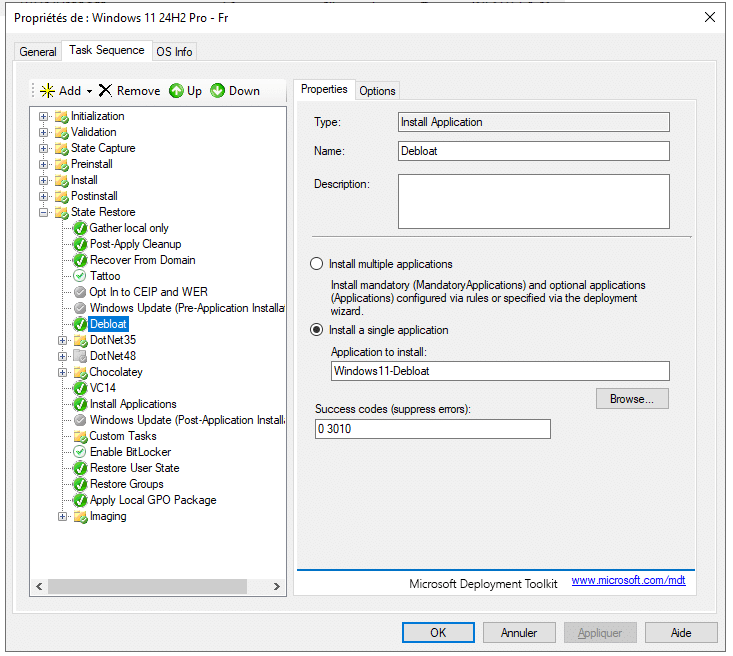
During deployment, your Windows 11 will be cleaned up.