Resolving the Veeam error: “On-host proxy requires upgrade” after migrating or reinstalling a Hyper-V host
In this tutorial, we’ll see how to resolve the Veeam “On-host proxy requires upgrade” error that can occur after migrating or reinstalling a Hyper-V host. This error prevents the use of proxies on the host and can block your backups. We’ll detail the steps to identify the cause, update the necessary components, and restore your backup infrastructure to normal operation without risk of data loss.
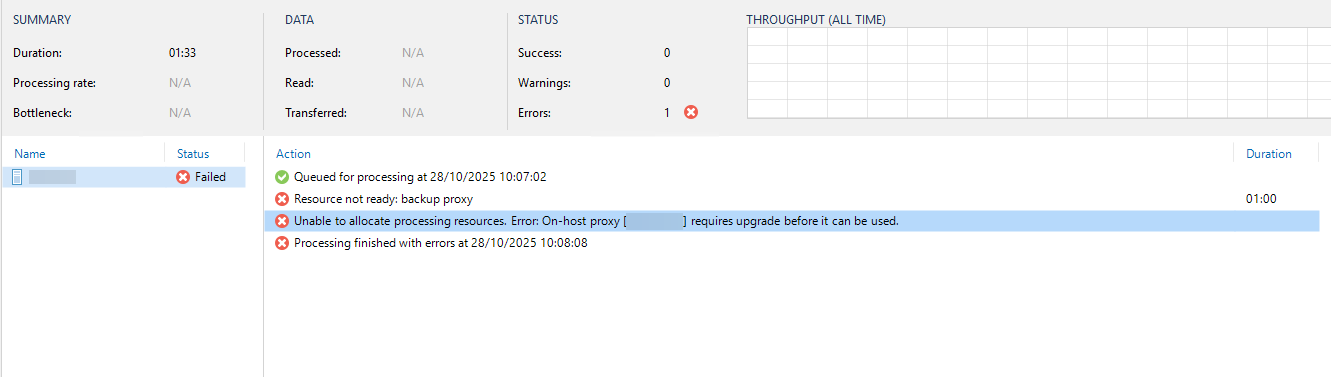
In the results of your backups, you have the following error:
Unable to allocate processing resources. Error: On-host proxy [hostname] requires upgrade before it can be used.
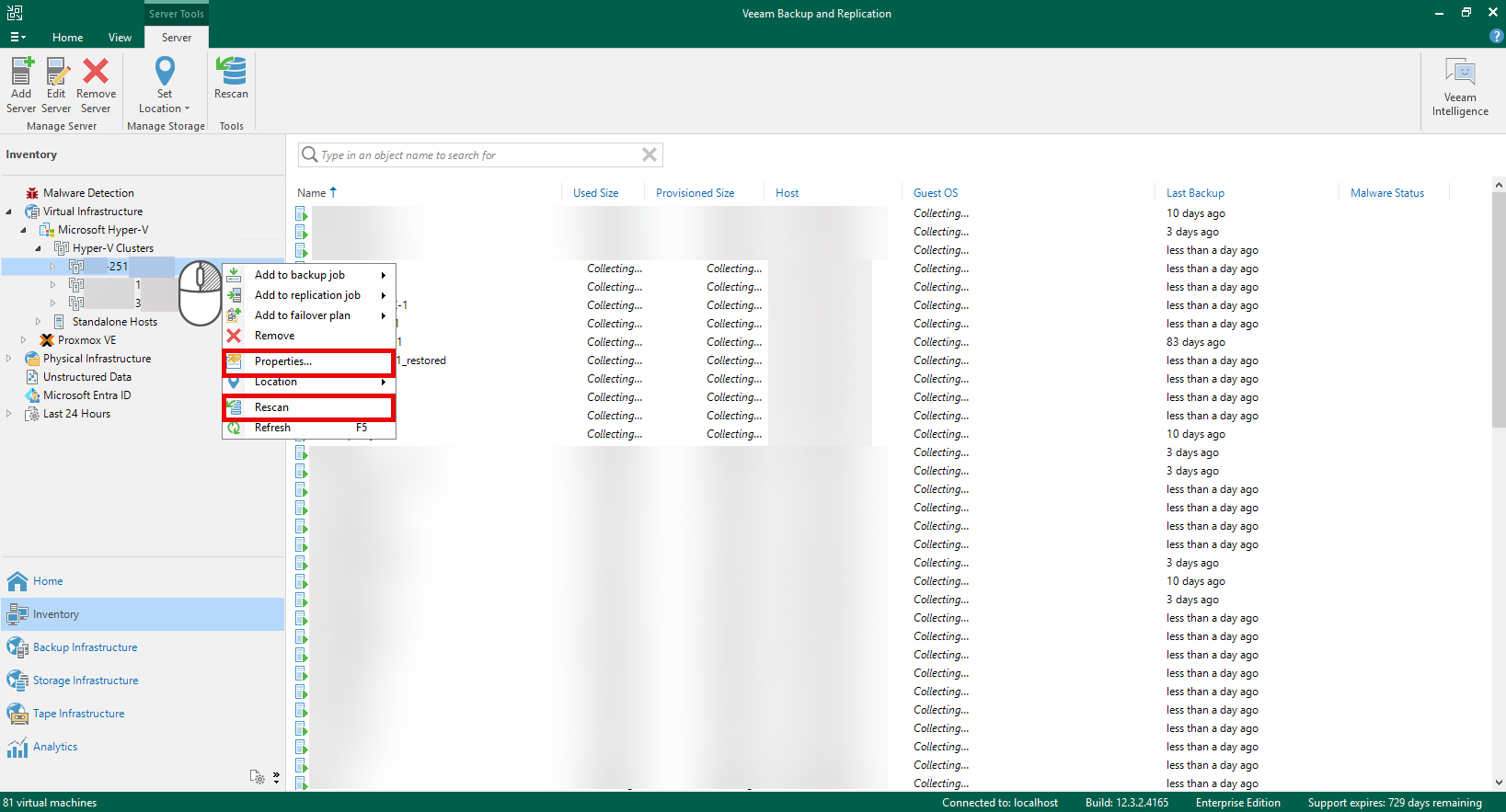
Dans la plupart des cas, cette erreur peut être résolue directement depuis la console Veeam en effectuant un clic droit sur le cluster Hyper-V ou l’hôte concerné, puis en sélectionnant “Rescan” ou en suivant l’assistant disponible dans les propriétés de l’hôte
In this tutorial, we’ll address a specific scenario: reinstalling a Hyper-V host server. This might involve an upgrade, such as migrating from Windows Server 2019 to Windows Server 2025, or a complete server reinstallation with a rename. As we’ll see, the way the server is reinstalled and renamed is crucial for successfully resolving the issue.
In my case, it was a migration to a new cluster under Windows Server 2025. After removing two nodes from the existing cluster under Windows Server 2019, I installed Windows Server 2025 on these two servers and started by creating a new Hyper-V cluster. Up to this point, everything went smoothly.
To continue deploying the new cluster, I added it to my server without any problems, and everything seemed fine. I then started a few virtual machines to test their behavior and perform a backup test. At that point, I was quite confident, having already set up a Hyper-V cluster on Windows Server 2025 without encountering any issues.
Then comes the time for the backup test, and that’s when the error occurs:
“Unable to allocate processing resources. Error: On-host proxy [hostname] requires upgrade before it can be used.”
After doing some research on the internet and having already encountered this problem, I tried several solutions:
Perform a server rescan from the Veeam console.
Uninstall and reinstall Veeam components on Hyper-V hosts,
Temporarily disable all security features (antivirus and firewall),
Verified network connectivity between the Hyper-V hosts and the Veeam server, without detecting any problems.
Despite all these actions, I found myself at an impasse: it was impossible to launch functional backups, the error persisted systematically.
As a precaution, I installed a new Veeam server on a virtual machine and performed a backup test. This time, everything worked correctly, confirming that the problem originated with Veeam and not the Hyper-V cluster.
Back in the Veeam console, I see that the Hyper-V host under Windows Server 2019 still appears as Unavailable and it is impossible to remove it via the interface.
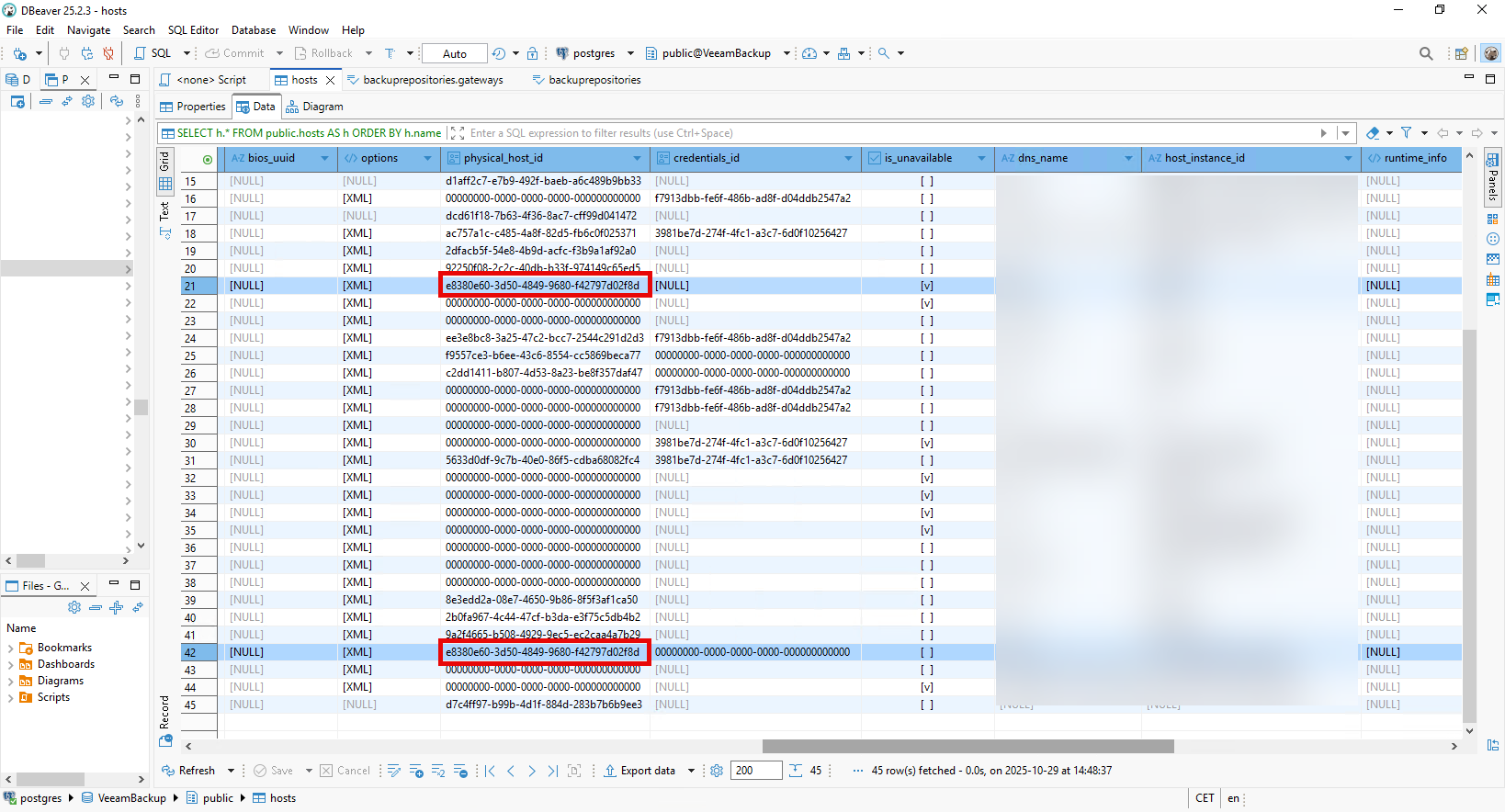
As a last resort, I decide to examine the Veeam database directly, and more specifically the hosts table.
This table contains all the hosts added to Veeam, whether they are used for backup, inventory, proxies, etc. To my great surprise, I discovered that Veeam never automatically deletes old records: traces of servers that were decommissioned several years ago can still be found.
In the hosts table, I do find two records corresponding to my server:
one dating from its installation under Windows Server 2019,
and the other one created after its reinstallation under Windows Server 2025.
Comparing these records, I notice that the physical_host_id field is identical in both cases. This is because this value is based on the hardware identifier of the physical machine’s BIOS, which did not change between the two installations.
Having little to lose, I decide to delete the record corresponding to the old server installation in the hosts table, then restart the Veeam server so that the change takes effect.
Once the service was restarted, I performed a rescan of the Hyper-V cluster. The operation proceeded without incident, and during the new backup test, everything worked perfectly.
This “On-host proxy requires upgrade” error problem that occurred after the migration to Windows Server 2025 actually stemmed from a conflict in the Veeam database, related to an old host record that was still present.
Veeam identifies physical servers using the BIOS-based physical_host_id field, which explains why reinstalling the same server under a new system (or with a new name) may lead to internal inconsistency.
By deleting the old record from the hosts table and running a Rescan, everything went back to normal.
Good practices to remember:
Always check for outdated hosts in the Veeam database after a migration or reinstallation.
Perform a systematic rescan of the cluster or hosts after any major change.
Avoid hostname changes when possible, or plan a clean reintegration into Veeam.
Thanks to this intervention, the Hyper-V cluster now works perfectly with Veeam, and backups run without the slightest error.
I also took advantage of this foray into the database to do some cleanup. I removed old servers that were no longer in use and updated certain fields, such as records and IP addresses, which can be modified directly in the table.
Romain Drouche
System Architect | MCSE: Core Infrastructure
IT infrastructure expert with over 15 years of field experience. Currently a Systems and Networks Project Manager and Information Systems Security (ISS) expert, I use my expertise to ensure the reliability and security of technological environments.
3 thoughts on “Resolving the Veeam error: “On-host proxy requires upgrade” after migrating or reinstalling a Hyper-V host”
This fixed it for me, also an old ESXI host converted to Hyper-v, it didn’t let me delete the row so I amended the physical host ID and saved it, rebooted and it’s back. Thanks so much I’d spent a day and a half on this already!
I had the same issue, migrated a physical ESXi to Hyper-V, removed the old sever from Veeam, but could not create a backup. I update the record in the host table and also did some clean-up and it all started to work.

This fixed it for me, also an old ESXI host converted to Hyper-v, it didn’t let me delete the row so I amended the physical host ID and saved it, rebooted and it’s back. Thanks so much I’d spent a day and a half on this already!
Oh man you’re the best!
I had the same issue, migrated a physical ESXi to Hyper-V, removed the old sever from Veeam, but could not create a backup. I update the record in the host table and also did some clean-up and it all started to work.
Thank you very much!
Greetz from NL
I really appreciate your help! It worked perfectly today, February 3rd, 2025! Using Veeam 13 and Windows Server 2025! Greetings from Argentina