In this tutorial, I explain how to see the schema version of your Active Directory environment.
To do this, we will use PowerShell with the Get-ADObject cmdlet which will allow us to display the schema version.
View Active Directory Schema Version with PowerShell
Open a PowerShell window on a domain controller as administrator.
We will use Get-ADObject to display the schema version.
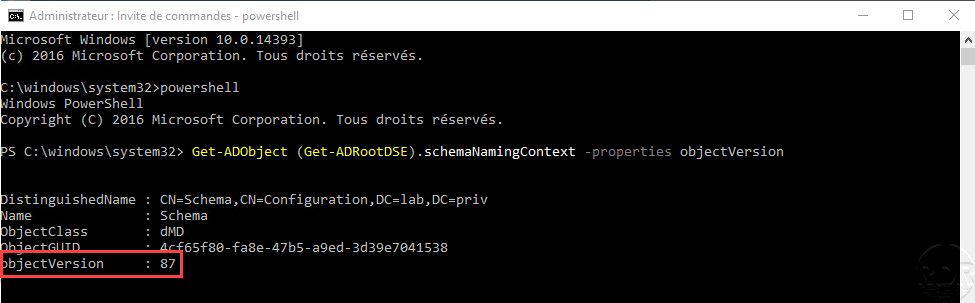
Enter the following cmdlet to display schema-related information.
Get-ADObject (Get-ADRootDSE).schemaNamingContext -properties objectVersionThe objectVersion property displays the schema version.
In the cmdlet return, look at the objectVersion property to get the Active Directory schema version.
List of schema versions based on Windows Server
| Version de Windows | Version |
|---|---|
| Windows Server 2025 | 91 |
| Windows Server 2019 | 88 |
| Windows Server 2016 | 87 |
| Windows Server 2012R2 | 69 |
| Windows Server 2012 | 56 |
| Windows Server 2008R2 | 47 |
| Windows Server 2008 | 44 |
| Windows Server 2003R2 | 31 |
| Windows Server 2003 | 30 |
| Windows Server 2000 | 13 |
