Table of Content
Introduction
To manage certain types of operations in an Active Directory environment, there are five operations masters. These are also called FSMO roles. (Flexible Single Master Operation).
A domain controller can have zero or more roles. A role can only exist on one domain controller.
Of the 5 roles, 2 are unique in the forest and 3 are unique per domain.
In a single-domain environment, we will have 5 operations masters, and in an environment with a subdomain (child domain), we will have 8 operations masters.
The FSMO roles
Schema Controller
The controller that has the schema controller role is the only domain controller authorized to make changes to the Active Directory schema and it is also responsible for propagating partition changes to other copies of domain controllers in the forest.
The temporary absence of this operations master does not prevent the Active Directory environment from functioning correctly. However, the installation of certain software, such as Exchange, requires the operations master to be online because changes are made to the schema. Installing a domain controller with a new version of Windows Server may also require the operations master role to be available.
This role is unique in the forest.
Domain Name Registrar
The Domain Name Master manages the addition and removal of domains in the Active Directory forest.
Because this type of change is rare, the role may be temporarily unavailable.
This role is unique in the forest.
PDC Emulator
The PDC emulator (Primary Domain Controller) performs the following functions in the field:
- Source of time for other computers.
- Password change propagation and account locking
- Primary source for editing group policies (GPO) to avoid any conflicts.
- Ensures backward compatibility for NT domains.
The absence of the PDC emulator is usually felt quickly, and users may have difficulty connecting.
This role is unique in the field.
RID Master
The Relative ID (RID) master’s role is to distribute RID pools to domain controllers to ensure that each domain controller generates unique SIDs for objects.
The temporary absence of this operations manager is tolerated.
This role is unique in the field.
Infrastructure Master
The infrastructure master’s role is to manage cross-domain references of objects from its domain in another domain.
In a single-domain environment, this operations master is of little importance.
The temporary absence of this operations manager is tolerated.
This role is unique in the field.
Find the FSMO roles
Now that we have seen the 5 operations masters, we will see how to find them in the domain.
In an environment where there is only one domain controller, it should normally have all 5 roles.
The easiest way to find the operations masters is to use the utility netdom or PowerShell cmdlets.
It is possible to do it graphically, but this involves opening 3 different consoles and saving the Schema console.
NETDOM
From a domain controller, open a command prompt and enter the following command to display the 5 roles with the domain controller.
netdom query fsmo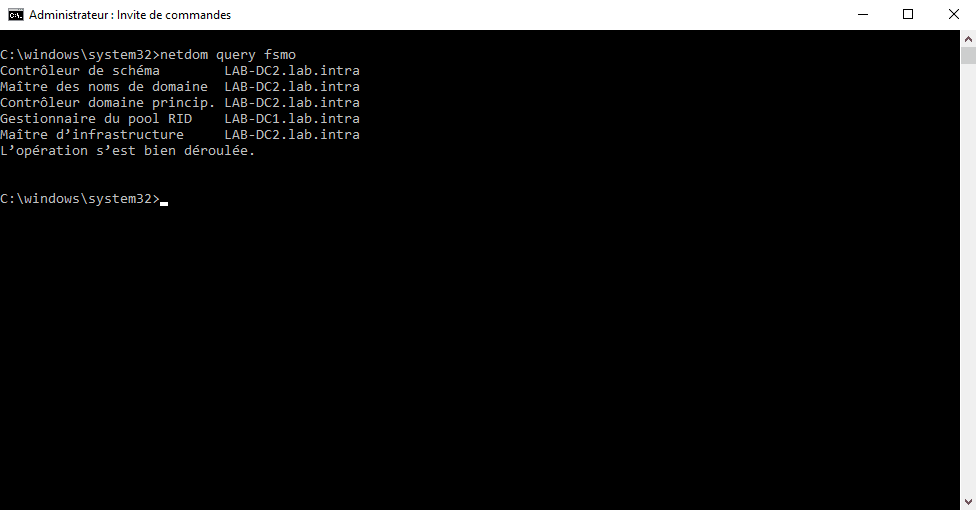
PowerShell
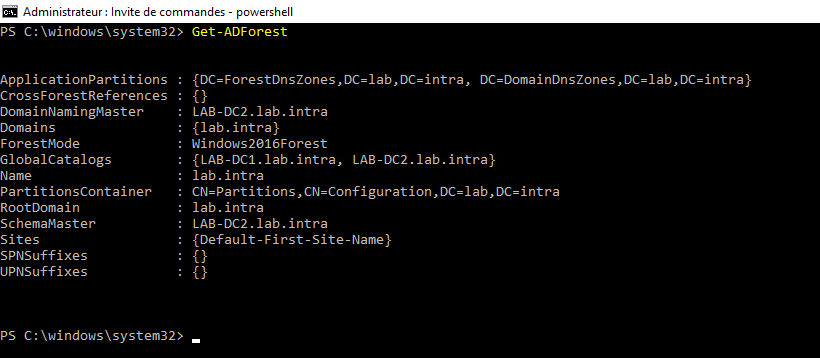
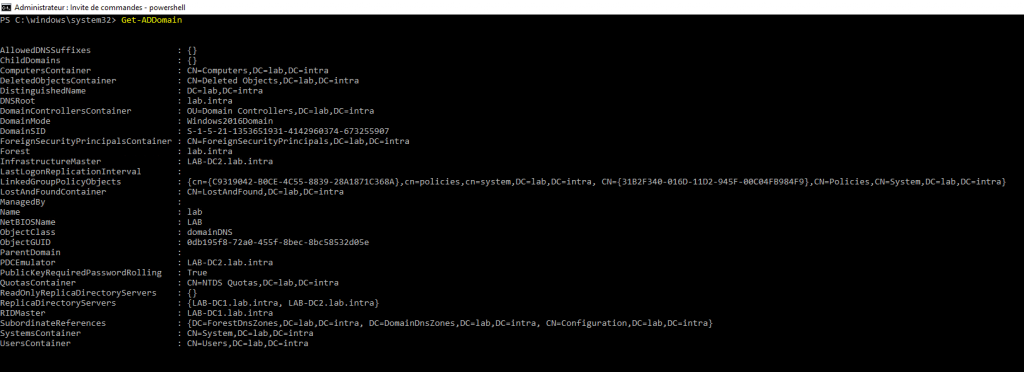
To access FSMO roles in PowerShell, you need to use cmdlets. Get-ADforest And Get-ADDomainThe first cmdlet will return information about the forest including the 2 FSMO roles and the second will return information about the domain with the 3 operations masters.
Transferring FSMO roles
It is possible to transfer FSMO roles from one domain controller to another. This operation is performed when a domain controller is removed from the environment and it holds one or more roles.
There are two types of transfer:
- Normal forwarding, which is used when the domain controller is online.
- Forced transfer (sixteen = seize) when the controller is offline.
As with role display, it is possible to perform the normal transfer using the administration consoles.
In this lesson, we will see how to use the utility NTDSUTIL and the PowerShell cmdlet Move-ADDirectoryServerOperationMasterRole.
Transfer with NTDSUTIL
From a command prompt on a domain controller.
> ntdsutil
> roles
> connections
> connect to the name of the DC who will receive the role
> q
Enter one of the commands below to perform the normal transfer:
 # Assignment Master
> transfer naming master
# Schema controller
> transfer schema master
# Master RID
> transfer RID master
# PDC Emulator
> transfer pdc
# Master infrastructure
> transfer infrastructure master
Enter one of the commands below to force the transfer (sixteen):
# Assignment Master
> sixteen naming master
# Schema controller
> sixteen schema master
# Master RID
> sixteen RID master
# PDC Emulator
> sixteen pdc
# Master infrastructure
> sixteen infrastructure master
Transfer with Move-ADDirectoryServerOperationMasterRole
The cmdlet Move-ADDirectoryServerOperationMasterRole is simpler to use, from a domain controller open a PowerShell window.
Normal transfer:
Move-ADDirectoryServerOperationMasterRole -Identity "name_of_the_DC_that_will_receive_the_role" -OperationMasterRole "Identity_of_the_role"
Forced transfer: simply add the parameter -strength to order.
Move-ADDirectoryServerOperationMasterRole -Identity "name_of_the_DC_that_will_receive_the_role" -OperationMasterRole "role_identifier" -force