Inhaltsverzeichnis
Hintergrund: Temporärer Profilfehler bei der Anmeldung
Aus zahlreichen und oft unbekannten Gründen melden sich Benutzer mit einem temporären Profil bei ihrer Sitzung an.
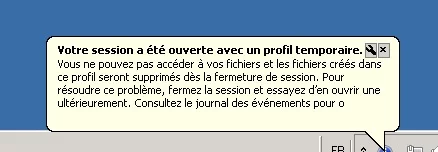
Der Benutzer kann seine Einstellungen, insbesondere sein Outlook-Profil, nicht finden.
Alles, was im Ordner C:\Users\TEMP gespeichert ist, wird beim Abmelden nicht gesichert.
Wenn Sie eine GPO zur Ordnerumleitung (Desktop/Dokumente…) anwenden, werden die darin geänderten Dateien und Ordner gesichert.
Lösung zum Beheben des Problems mit dem temporären Profil
Die Lösung besteht darin, die .BAK-Registrierungsschlüssel am folgenden Speicherort zu löschen: HKEY_LOCAL_MACHINE\SOFTWARE\Microsoft\Windows NT\CurrentVersion\ProfileList
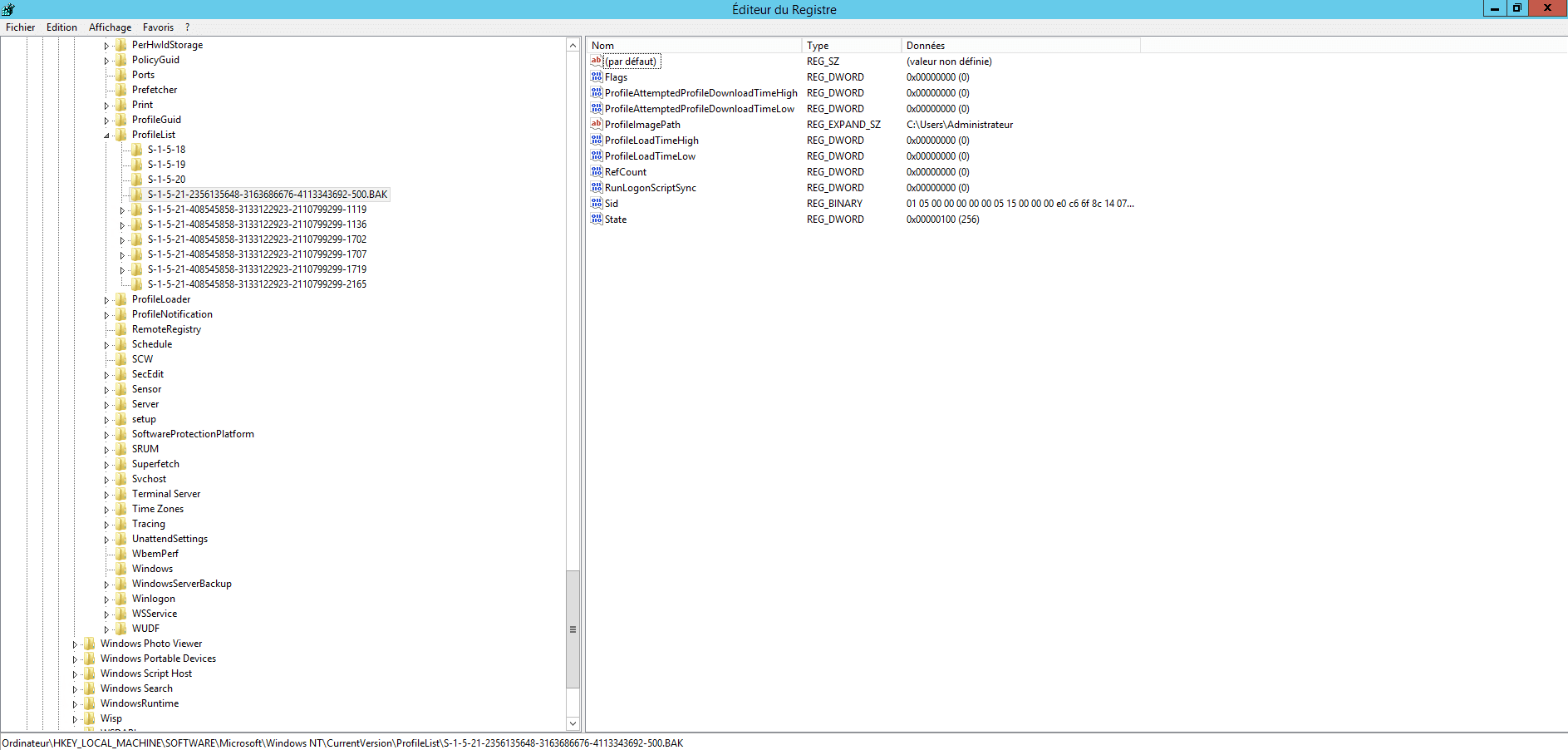
Auf einer RDS 2012R2 Farm hatte ich regelmäßig das Problem mit 3 Benutzern und suchte daher nach einer Möglichkeit, diese Bereinigung automatisch per Skript mithilfe einer geplanten Aufgabe durchzuführen.
VBS-Skript:
' Repo : https://git.rdr-it.com/root/scripts/-/blob/master/VBS/RDS-temporary-profile-cleaning.vbs

Const ForAppending = 8
Const HKEY_LOCAL_MACHINE = &H80000002

Dim CheminScriptActuel, ScriptFileName, Position, CheminLog

CheminScriptActuel = Left(wscript.scriptfullname,Len(wscript.scriptfullname)-Len(wscript.scriptname)-1)

ScriptFileName = wscript.scriptname
Position = InstrRev(ScriptFileName,".")
if (Position > 0) Then ScriptFileName = Left(ScriptFileName, Position - 1)

CheminLog = CheminScriptActuel & "" & ScriptFileName & "_Log.txt"
strComputer = "."

'On Error Resume Next
Set objRegistry=GetObject("winmgmts:\" & strComputer & "rootdefault:StdRegProv")
Set objFSO = CreateObject("Scripting.FileSystemObject")
Set objTextFile = objFSO.OpenTextFile (CheminLog, ForAppending, True)
objTextFile.WriteLine("-------------------------------")
objTextFile.WriteLine("Debut de la suppression des profils temporaires : " & now)
objTextFile.WriteLine("-------------------------------")

strKeyPath = "SOFTWAREMicrosoftWindows NTCurrentVersionProfileList"
objRegistry.EnumKey HKEY_LOCAL_MACHINE, strKeyPath, arrSubkeys
For Each objSubkey In arrSubkeys
  If Instr(UCase(objSubkey),".BAK") Then
    'wscript.echo objsubkey
    'wscript.echo strkeypath & "" & objSubkey
    objTextFile.WriteLine(now & " clé a supprimer détectée : " & strKeyPath & "" & objSubkey)
    Call DeleteRegEntry(HKEY_LOCAL_MACHINE, strKeyPath & "" & objSubkey)

  End if
Next

objTextFile.WriteLine("Fin de la suppression des profils temporaires : " & now)
objTextFile.WriteLine("")
objTextFile.Close 'Fermeture du fichier
Set objTextFile = Nothing
wscript.quit

Function DeleteRegEntry(sHive, sEnumPath)
  ' Attempt to delete key.  If it fails, start the subkey
  ' enumration process.
  lRC = objRegistry.DeleteKey(sHive, sEnumPath)
  'wscript.echo sHive
  'wscript.echo sEnumPath
  ' The deletion failed, start deleting subkeys.
  If (lRC <> 0) Then

    ' Subkey Enumerator
    On Error Resume Next
    lRC = objRegistry.EnumKey(HKEY_LOCAL_MACHINE, sEnumPath, sNames)
    For Each sKeyName In sNames
      If Err.Number <> 0 Then Exit For
      'wscript.echo sHive, sEnumPath & "" & sKeyName
      lRC = DeleteRegEntry(sHive, sEnumPath & "" & sKeyName)
      objTextFile.WriteLine(now & " Suppression de la sous clé : " & sEnumPath & "" & sKeyName)
    Next

    On Error Goto 0
    ' At this point we should have looped through all subkeys, trying
    ' to delete the registry key again.
    lRC = objRegistry.DeleteKey(sHive, sEnumPath)

  End If

End Function
PowerShell-Skript :
# Chemin du script et du fichier log
$ScriptPath = Split-Path -Parent $MyInvocation.MyCommand.Definition
$ScriptName = [System.IO.Path]::GetFileNameWithoutExtension($MyInvocation.MyCommand.Name)
$LogFile = Join-Path $ScriptPath "$ScriptName`_Log.txt"

# Fonction pour écrire dans le fichier log
function Write-Log {
    param ([string]$message)
    Add-Content -Path $LogFile -Value $message
}

# Écrire en-tête du log
Write-Log "-------------------------------"
Write-Log "Début de la suppression des profils temporaires : $(Get-Date)"
Write-Log "-------------------------------"

# Chemin de la clé de registre contenant les profils utilisateurs
$RegPath = 'HKLM:\SOFTWARE\Microsoft\Windows NT\CurrentVersion\ProfileList'

# Récupérer les sous-clés
$SubKeys = Get-ChildItem -Path $RegPath -ErrorAction SilentlyContinue

foreach ($Key in $SubKeys) {
    if ($Key.PSChildName -like '*.bak') {
        Write-Log "$(Get-Date) Clé à supprimer détectée : $($Key.Name)"
        Remove-RegistryKeyRecursive -KeyPath $Key.Name
    }
}

Write-Log "Fin de la suppression des profils temporaires : $(Get-Date)"
Write-Log ""

# Fonction pour supprimer une clé de registre et ses sous-clés récursivement
function Remove-RegistryKeyRecursive {
    param ([string]$KeyPath)

    try {
        Remove-Item -Path "Registry::$KeyPath" -Recurse -Force -ErrorAction Stop
    }
    catch {
        # Suppression récursive manuelle si échec
        $SubKeys = Get-ChildItem -Path "Registry::$KeyPath" -ErrorAction SilentlyContinue
        foreach ($SubKey in $SubKeys) {
            Remove-RegistryKeyRecursive -KeyPath $SubKey.PSPath.Replace("Microsoft.PowerShell.Core\Registry::", "")
            Write-Log "$(Get-Date) Suppression de la sous-clé : $($SubKey.Name)"
        }

        # Essayer de supprimer à nouveau la clé principale
        try {
            Remove-Item -Path "Registry::$KeyPath" -Force -ErrorAction Stop
        } catch {}
    }
}
Kopieren Sie das obige Skript in eine Datei mit der Erweiterung vbs/ps1 und erstellen Sie eine geplante Aufgabe, die jede Nacht auf jedem Remotedesktop-Sitzungshost ausgeführt wird.
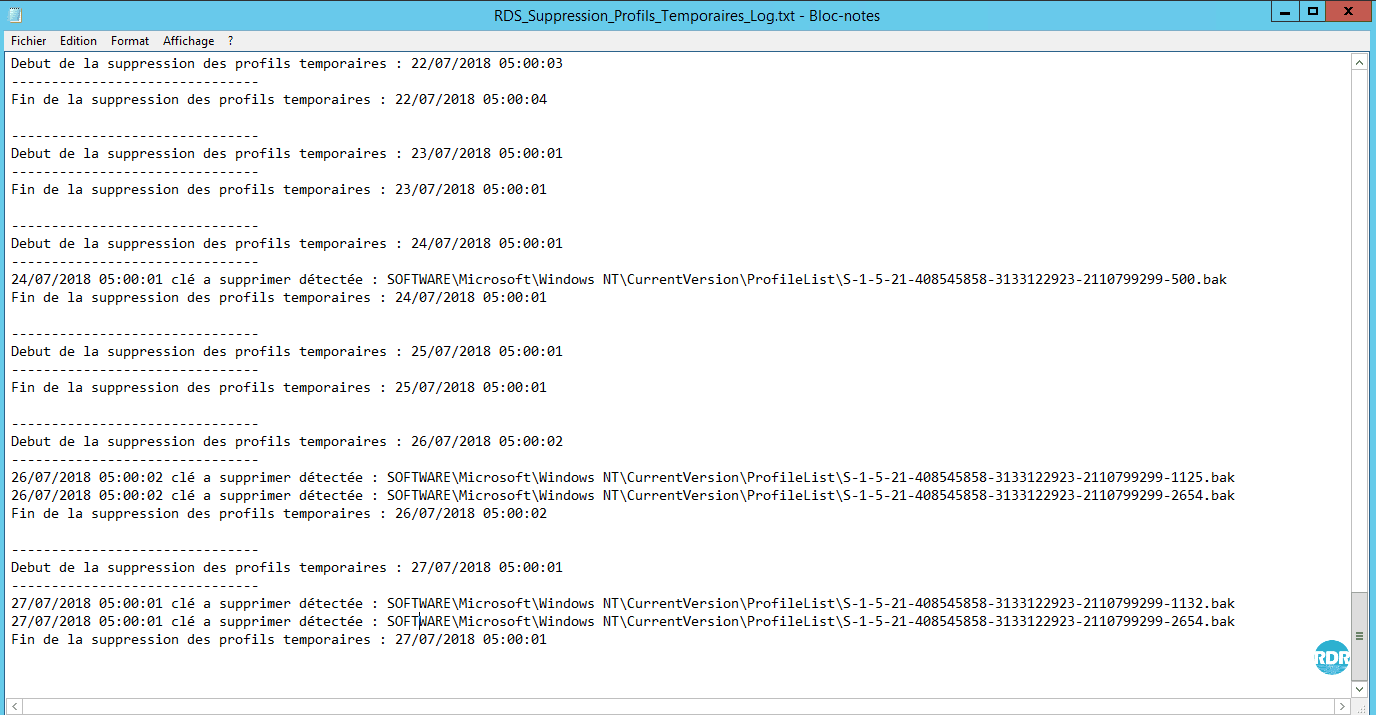
Das Skript generiert eine Protokolldatei mit den gelöschten Registrierungsschlüsseln.
PI: Temporäre Profilfehler können darauf zurückzuführen sein, dass der Windows XP RDP-Client den automatischen Ausgleich mit dem Broker-Dienst nicht unterstützt.
