Contesto: errore temporaneo del profilo all’accesso
Per molteplici e spesso sconosciute ragioni, gli utenti si ritrovano ad accedere alla loro sessione con un profilo temporaneo.
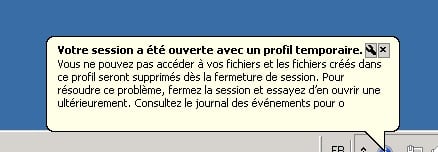
L’utente non riesce a trovare le proprie impostazioni, in particolare il profilo di Outlook.
Tutto il contenuto memorizzato nella cartella C:\Users\TEMP non viene sottoposto a backup quando l’utente si disconnette.
Se si applica un GPO di reindirizzamento cartelle (desktop/documenti…), i file e le cartelle modificati al suo interno verranno sottoposti a backup.
Soluzione per risolvere il problema temporaneo del profilo
La soluzione è eliminare le chiavi di registro .BAK nel seguente percorso: HKEY_LOCAL_MACHINE\SOFTWARE\Microsoft\Windows NT\CurrentVersion\ProfileList
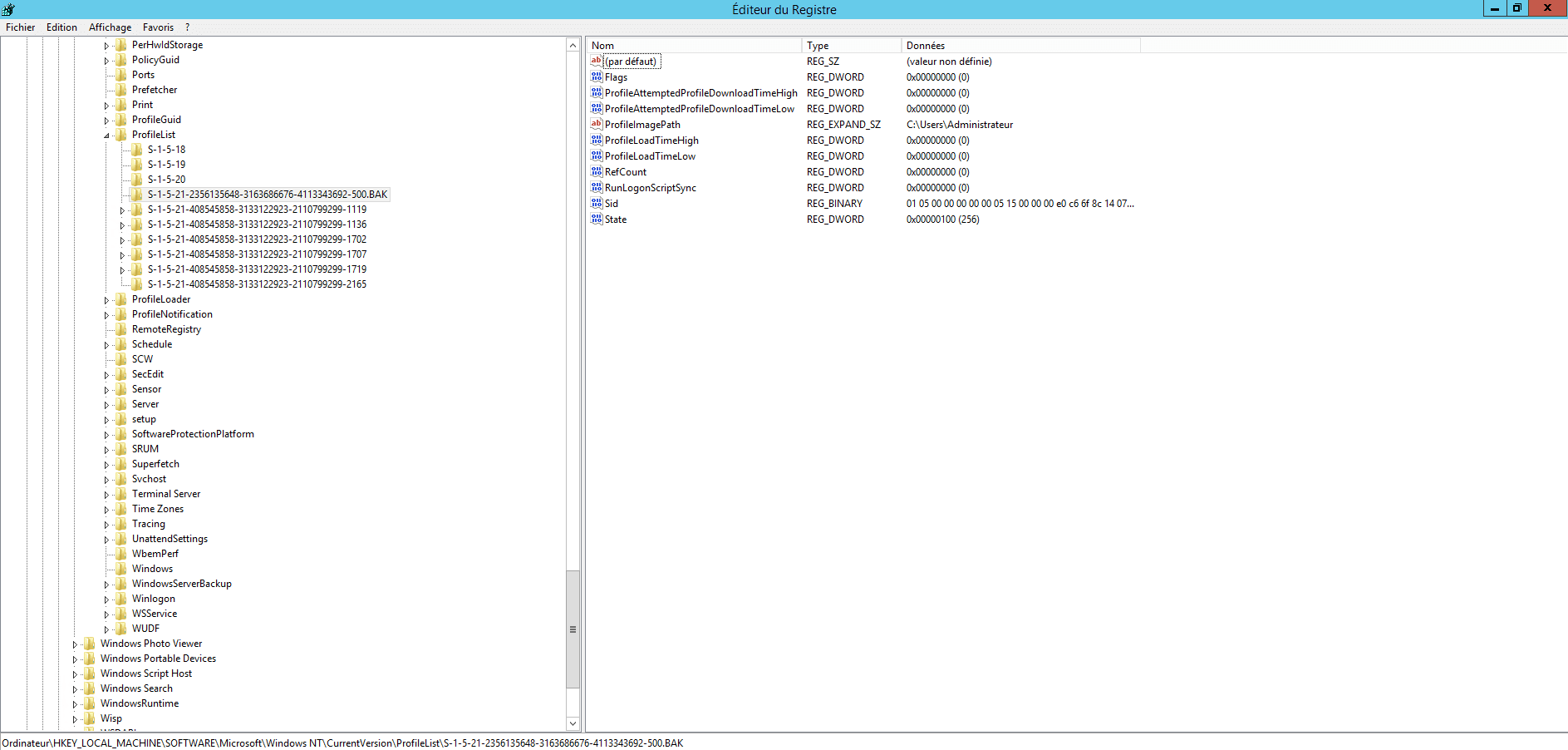
In una farm RDS 2012R2, avevo regolarmente problemi con 3 utenti e quindi ho cercato un modo per eseguire questa pulizia automaticamente tramite script utilizzando un’attività pianificata.
Script VBS :
' Repo : https://git.rdr-it.com/root/scripts/-/blob/master/VBS/RDS-temporary-profile-cleaning.vbs

Const ForAppending = 8
Const HKEY_LOCAL_MACHINE = &H80000002

Dim CheminScriptActuel, ScriptFileName, Position, CheminLog

CheminScriptActuel = Left(wscript.scriptfullname,Len(wscript.scriptfullname)-Len(wscript.scriptname)-1)

ScriptFileName = wscript.scriptname
Position = InstrRev(ScriptFileName,".")
if (Position > 0) Then ScriptFileName = Left(ScriptFileName, Position - 1)

CheminLog = CheminScriptActuel & "" & ScriptFileName & "_Log.txt"
strComputer = "."

'On Error Resume Next
Set objRegistry=GetObject("winmgmts:\" & strComputer & "rootdefault:StdRegProv")
Set objFSO = CreateObject("Scripting.FileSystemObject")
Set objTextFile = objFSO.OpenTextFile (CheminLog, ForAppending, True)
objTextFile.WriteLine("-------------------------------")
objTextFile.WriteLine("Debut de la suppression des profils temporaires : " & now)
objTextFile.WriteLine("-------------------------------")

strKeyPath = "SOFTWAREMicrosoftWindows NTCurrentVersionProfileList"
objRegistry.EnumKey HKEY_LOCAL_MACHINE, strKeyPath, arrSubkeys
For Each objSubkey In arrSubkeys
  If Instr(UCase(objSubkey),".BAK") Then
    'wscript.echo objsubkey
    'wscript.echo strkeypath & "" & objSubkey
    objTextFile.WriteLine(now & " clé a supprimer détectée : " & strKeyPath & "" & objSubkey)
    Call DeleteRegEntry(HKEY_LOCAL_MACHINE, strKeyPath & "" & objSubkey)

  End if
Next

objTextFile.WriteLine("Fin de la suppression des profils temporaires : " & now)
objTextFile.WriteLine("")
objTextFile.Close 'Fermeture du fichier
Set objTextFile = Nothing
wscript.quit

Function DeleteRegEntry(sHive, sEnumPath)
  ' Attempt to delete key.  If it fails, start the subkey
  ' enumration process.
  lRC = objRegistry.DeleteKey(sHive, sEnumPath)
  'wscript.echo sHive
  'wscript.echo sEnumPath
  ' The deletion failed, start deleting subkeys.
  If (lRC <> 0) Then

    ' Subkey Enumerator
    On Error Resume Next
    lRC = objRegistry.EnumKey(HKEY_LOCAL_MACHINE, sEnumPath, sNames)
    For Each sKeyName In sNames
      If Err.Number <> 0 Then Exit For
      'wscript.echo sHive, sEnumPath & "" & sKeyName
      lRC = DeleteRegEntry(sHive, sEnumPath & "" & sKeyName)
      objTextFile.WriteLine(now & " Suppression de la sous clé : " & sEnumPath & "" & sKeyName)
    Next

    On Error Goto 0
    ' At this point we should have looped through all subkeys, trying
    ' to delete the registry key again.
    lRC = objRegistry.DeleteKey(sHive, sEnumPath)

  End If

End Function
Script PowerShell
# Chemin du script et du fichier log
$ScriptPath = Split-Path -Parent $MyInvocation.MyCommand.Definition
$ScriptName = [System.IO.Path]::GetFileNameWithoutExtension($MyInvocation.MyCommand.Name)
$LogFile = Join-Path $ScriptPath "$ScriptName`_Log.txt"

# Fonction pour écrire dans le fichier log
function Write-Log {
    param ([string]$message)
    Add-Content -Path $LogFile -Value $message
}

# Écrire en-tête du log
Write-Log "-------------------------------"
Write-Log "Début de la suppression des profils temporaires : $(Get-Date)"
Write-Log "-------------------------------"

# Chemin de la clé de registre contenant les profils utilisateurs
$RegPath = 'HKLM:\SOFTWARE\Microsoft\Windows NT\CurrentVersion\ProfileList'

# Récupérer les sous-clés
$SubKeys = Get-ChildItem -Path $RegPath -ErrorAction SilentlyContinue

foreach ($Key in $SubKeys) {
    if ($Key.PSChildName -like '*.bak') {
        Write-Log "$(Get-Date) Clé à supprimer détectée : $($Key.Name)"
        Remove-RegistryKeyRecursive -KeyPath $Key.Name
    }
}

Write-Log "Fin de la suppression des profils temporaires : $(Get-Date)"
Write-Log ""

# Fonction pour supprimer une clé de registre et ses sous-clés récursivement
function Remove-RegistryKeyRecursive {
    param ([string]$KeyPath)

    try {
        Remove-Item -Path "Registry::$KeyPath" -Recurse -Force -ErrorAction Stop
    }
    catch {
        # Suppression récursive manuelle si échec
        $SubKeys = Get-ChildItem -Path "Registry::$KeyPath" -ErrorAction SilentlyContinue
        foreach ($SubKey in $SubKeys) {
            Remove-RegistryKeyRecursive -KeyPath $SubKey.PSPath.Replace("Microsoft.PowerShell.Core\Registry::", "")
            Write-Log "$(Get-Date) Suppression de la sous-clé : $($SubKey.Name)"
        }

        # Essayer de supprimer à nouveau la clé principale
        try {
            Remove-Item -Path "Registry::$KeyPath" -Force -ErrorAction Stop
        } catch {}
    }
}
Copiare lo script precedente in un file con estensione vbs/ps1 ed eseguire un’attività pianificata che venga eseguita ogni notte su ciascun host di sessione Desktop remoto.
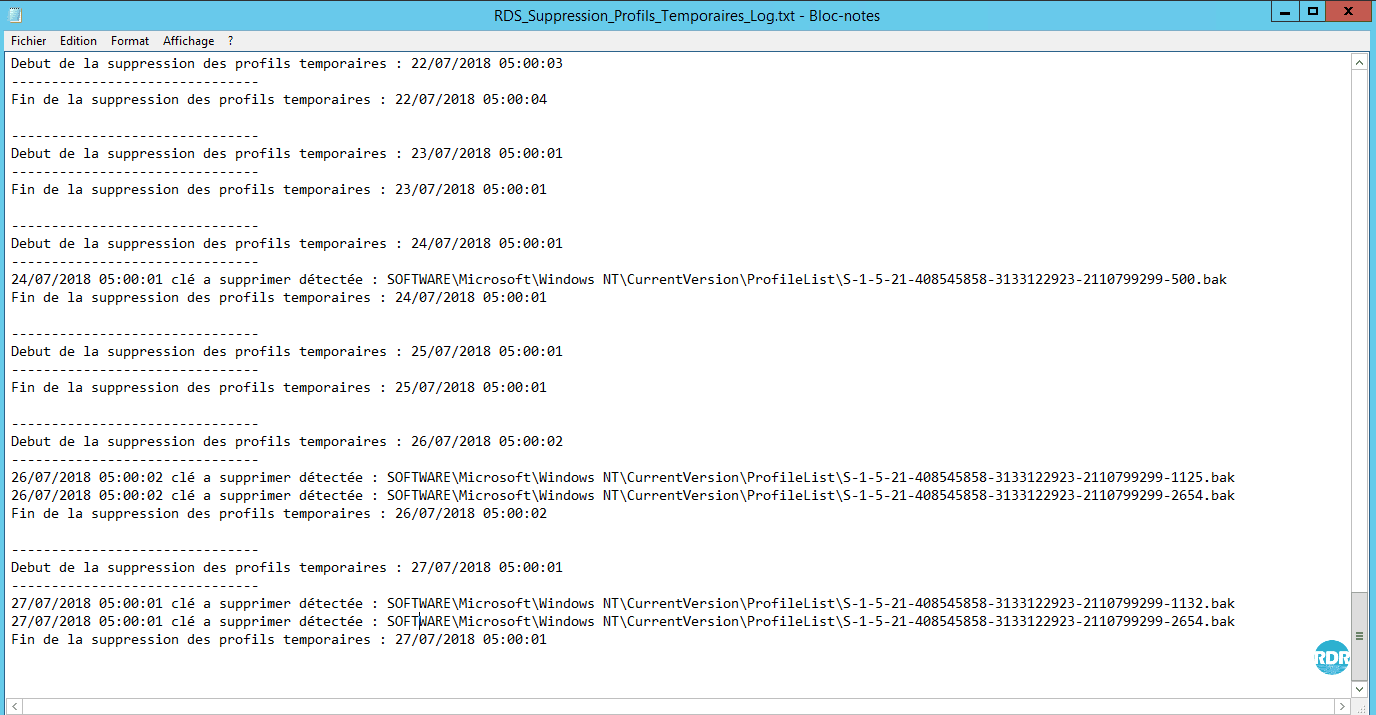
Lo script genera un file di registro con le chiavi di registro eliminate.
PI: gli errori temporanei del profilo potrebbero essere dovuti al fatto che il client RDP di Windows XP non supporta il bilanciamento automatico con il servizio Broker.