Problem
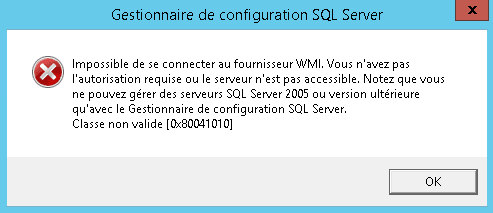
When opening the SQL Server xxxx Configuration Manager you get the following error message: “Unable to connect to the WMI provider.” You do not have the required permission or the server is not accessible. that you can manage SQL Server 2005 or later with SQL Server Configuration Manager Invalid Class [0x80041010]
Cause
According to the Microsoft site would be due to a SQL Server instance uninstall, out in my case I had this problem after an installation.
Solution
1. Open a command prompt window in Administrator.
2. Enter the following command:
mofcomp "C:\Program Files (x86)\Microsoft SQL Server\XXX\Shared\sqlmgmproviderxpsp2up.mof"
XXX: corresponds to the version of your SQL server.
3. Restart the WMI service (PowerShell)
Restart-Service Winmgmt
Note : Cette erreur empêchait également la connexion de PRTG pour le monitoring de la base.