Symptom
On RDS user sessions, printers go back times.
Cause
The problem comes from the CSR (Client Side Rendering) which makes it possible to transform the file in RAW format before sending it to the print server.
Solutions
New printer
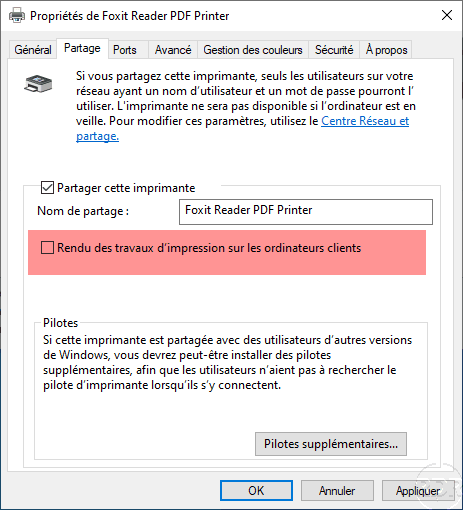
When setting up sharing of a new printer, uncheck: Render Print Jobs to Client Computers found on the Sharing tab of the printer properties.
Printers already mapped
On the print server uncheck the box; Rendering print jobs on client computers on printers as for a new one.
On each remote desktop session host, go to the registry at the following location:
HKEY_LOCAL_MACHINE\SOFTWARE\Microsoft\Windows NT\CurrentVersion\Print\Providers\Client Side Rendering Print Provider\
And delete the registry keys.
Source : Impression problème avec le CSR dans un environnement RDS .