In this tutorial, I will explain how to change Docker’s default address range.
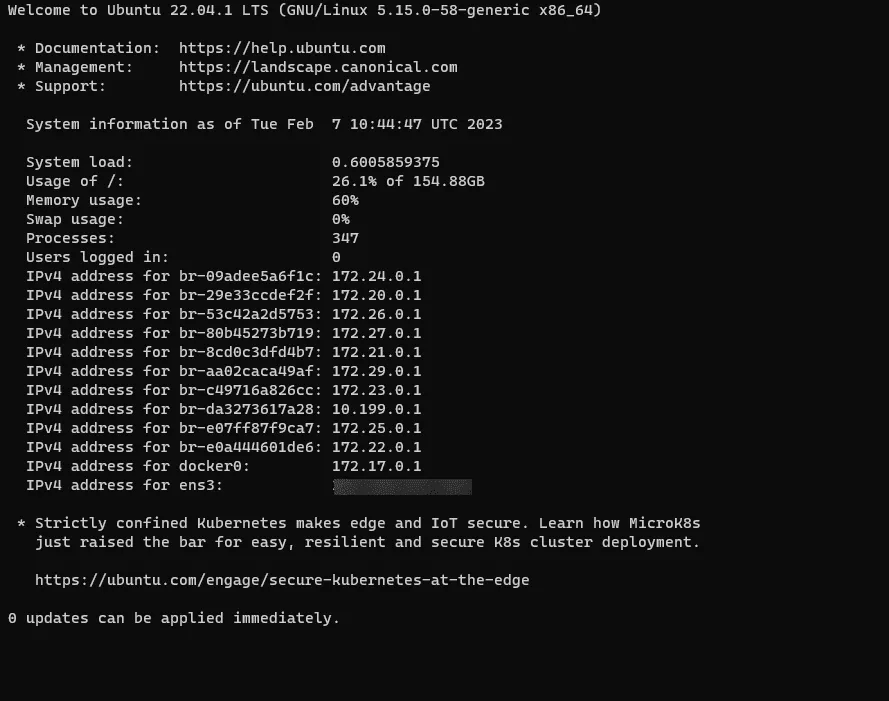
By default, Docker uses class “B” private addresses from 172.17 to 172.32.
For each “stack” or container, it will assign a range with a mask in /16.
Here is an example :
In some cases, it may be necessary to modify this address range to avoid a conflict with an existing network at the physical level.
Indeed, if you have in your environment, a network or a vlan using a range which is assigned to the containers, there will be a conflict and the server where the container operates will try to contact the container in its range instead of responding to the remote machine.
Now here’s how to change the range:
Open file /etc/docker/daemon.json :
nano /etc/docker/daemon.json
If you have never modified the file, it does not exist by default, so it will be created when saving.
In the file, add the content below (adapt the range according to your needs and your environment):
{
  "default-address-pools":
  [
    {"base":"10.150.0.0/16","size":24}
  ]
}
Here, Docker uses the place 10.150.0.0/16, using segments (subnet) in /24.
To take effect, restart the Docker service:
sudo systemctl restart docker
You now know how to change the IP address pool used by Docker.