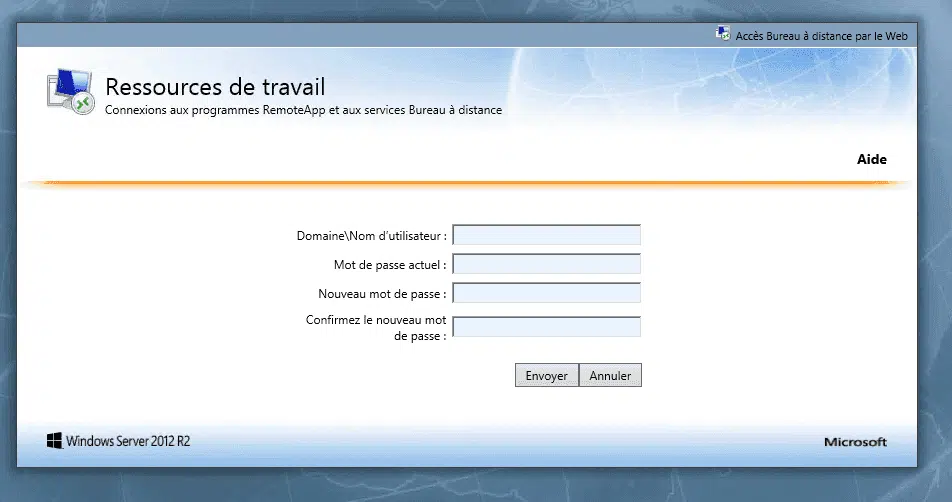
The following VBS script displays an alert to users at login that the password is soon to expire.
The script
' Days before to alert user
QtDiasAviso = 7
RedirectRdWeb = true
UrlRDWEB = "https://monserveur/RDWeb/Pages/fr-FR/password.aspx"
Message_alert = ""

Const ADS_UF_DONT_EXPIRE_PASSWD = &h10000

Set oTranslate = CreateObject("NameTranslate")
Set oNetwork = CreateObject("WScript.Network")
Set wshell = WScript.CreateObject("WScript.Shell")
oTranslate.Init 3,""
oTranslate.Set 3, oNetwork.UserDomain & "\" & oNetwork.UserName

Set objUserLDAP = GetObject _
  ("LDAP://"&oTranslate.Get(1))
intCurrentValue = objUserLDAP.Get("userAccountControl")

' Check if user account have date to password expires
If not intCurrentValue and ADS_UF_DONT_EXPIRE_PASSWD Then

    ' Determine when password expires and calculate the days
    ' Instead of PasswordExpirationDate, you can use the accountExpirationDate property, depending on the case
    SenhaAlt = DateDiff("d",date,objUserLDAP.PasswordExpirationDate)

    ' If password will expire
    if (SenhaAlt <= QtDiasAviso) then
    Message_alert = "Votre mot de passe expire dans  " & SenhaAlt & " jour(s) " & vbCrLf & vbCrLf & "Merci de le changer dès que possible"

    if(RedirectRdWeb = true) then
      Message_alert = Message_alert & vbCrLf & vbCrLf & "Une page intranet va s'ouvrir pour vous permettre le changement"
    end if

     MsgBox Message_alert, vbExclamation,"Expiration de votre mot de passe"
    if(RedirectRdWeb = true) then
      wshell.Run UrlRDWEB
    end if
    end if

end if
Customizing the script
line 2 :
QtDiasAviso = 7
Number of days the message begins to appear
line 3 :
RedirectRdWeb = true
True : opens the page defined in the UrlRDWEB variable when the user clicks OK
False : Close the window when the user click OK
line 4 :
UrlRDWEB = “https://monserveur/RDWeb/Pages/fr-FR/password.aspx”
URL of the page where the user can change his password.
line 29,32 :
Customizing the message that is displayed to the user.